Hello Everyone.. I am going to post this after long time. I created this tutorial before 2 month but today I got time to post here.
Today in this tutorial I will show you:
//Create table into SQLite Database
DbHelper.java
package com.hk.sqlitedemo;
import android.content.Context;
import android.database.sqlite.SQLiteDatabase;
import android.database.sqlite.SQLiteOpenHelper;
public class DbHelper extends SQLiteOpenHelper {
static String DATABASE_NAME="userdata";
public static final String TABLE_NAME="user";
public static final String KEY_FNAME="fname";
public static final String KEY_LNAME="lname";
public static final String KEY_ID="id";
public DbHelper(Context context) {
super(context, DATABASE_NAME, null, 1);
}
@Override
public void onCreate(SQLiteDatabase db) {
String CREATE_TABLE="CREATE TABLE "+TABLE_NAME+" ("+KEY_ID+" INTEGER PRIMARY KEY, "+KEY_FNAME+" TEXT, "+KEY_LNAME+" TEXT)";
db.execSQL(CREATE_TABLE);
}
@Override
public void onUpgrade(SQLiteDatabase db, int oldVersion, int newVersion) {
db.execSQL("DROP TABLE IF EXISTS "+TABLE_NAME);
onCreate(db);
}
}
//activity to add recored
AddActivity.java
package com.hk.sqlitedemo;
import android.app.Activity;
import android.app.AlertDialog;
import android.content.ContentValues;
import android.content.DialogInterface;
import android.database.sqlite.SQLiteDatabase;
import android.os.Bundle;
import android.view.View;
import android.view.View.OnClickListener;
import android.widget.Button;
import android.widget.EditText;
public class AddActivity extends Activity implements OnClickListener {
private Button btn_save;
private EditText edit_first,edit_last;
private DbHelper mHelper;
private SQLiteDatabase dataBase;
private String id,fname,lname;
private boolean isUpdate;
@Override
public void onCreate(Bundle savedInstanceState) {
super.onCreate(savedInstanceState);
setContentView(R.layout.add_activity);
btn_save=(Button)findViewById(R.id.save_btn);
edit_first=(EditText)findViewById(R.id.frst_editTxt);
edit_last=(EditText)findViewById(R.id.last_editTxt);
isUpdate=getIntent().getExtras().getBoolean("update");
if(isUpdate)
{
id=getIntent().getExtras().getString("ID");
fname=getIntent().getExtras().getString("Fname");
lname=getIntent().getExtras().getString("Lname");
edit_first.setText(fname);
edit_last.setText(lname);
}
btn_save.setOnClickListener(this);
mHelper=new DbHelper(this);
}
// saveButton click event
public void onClick(View v) {
fname=edit_first.getText().toString().trim();
lname=edit_last.getText().toString().trim();
if(fname.length()>0 && lname.length()>0)
{
saveData();
}
else
{
AlertDialog.Builder alertBuilder=new AlertDialog.Builder(AddActivity.this);
alertBuilder.setTitle("Invalid Data");
alertBuilder.setMessage("Please, Enter valid data");
alertBuilder.setPositiveButton("Ok", new DialogInterface.OnClickListener() {
public void onClick(DialogInterface dialog, int which) {
dialog.cancel();
}
});
alertBuilder.create().show();
}
}
/**
* save data into SQLite
*/
private void saveData(){
dataBase=mHelper.getWritableDatabase();
ContentValues values=new ContentValues();
values.put(DbHelper.KEY_FNAME,fname);
values.put(DbHelper.KEY_LNAME,lname );
System.out.println("");
if(isUpdate)
{
//update database with new data
dataBase.update(DbHelper.TABLE_NAME, values, DbHelper.KEY_ID+"="+id, null);
}
else
{
//insert data into database
dataBase.insert(DbHelper.TABLE_NAME, null, values);
}
//close database
dataBase.close();
finish();
}
}
//activity to display record in list
DisplayActivity.java
package com.hk.sqlitedemo;
import java.util.ArrayList;
import android.app.Activity;
import android.app.AlertDialog;
import android.content.DialogInterface;
import android.content.Intent;
import android.database.Cursor;
import android.database.sqlite.SQLiteDatabase;
import android.os.Bundle;
import android.view.View;
import android.view.View.OnClickListener;
import android.widget.AdapterView;
import android.widget.AdapterView.OnItemClickListener;
import android.widget.AdapterView.OnItemLongClickListener;
import android.widget.ListView;
import android.widget.Toast;
public class DisplayActivity extends Activity {
private DbHelper mHelper;
private SQLiteDatabase dataBase;
private ArrayList<String> userId = new ArrayList<String>();
private ArrayList<String> user_fName = new ArrayList<String>();
private ArrayList<String> user_lName = new ArrayList<String>();
private ListView userList;
private AlertDialog.Builder build;
@Override
public void onCreate(Bundle savedInstanceState) {
super.onCreate(savedInstanceState);
setContentView(R.layout.display_activity);
userList = (ListView) findViewById(R.id.List);
mHelper = new DbHelper(this);
//add new record
findViewById(R.id.btnAdd).setOnClickListener(new OnClickListener() {
public void onClick(View v) {
Intent i = new Intent(getApplicationContext(), AddActivity.class);
i.putExtra("update", false);
startActivity(i);
}
});
//click to update data
userList.setOnItemClickListener(new OnItemClickListener() {
public void onItemClick(AdapterView<?> arg0, View arg1, int arg2, long arg3) {
Intent i = new Intent(getApplicationContext(), AddActivity.class);
i.putExtra("Fname", user_fName.get(arg2));
i.putExtra("Lname", user_lName.get(arg2));
i.putExtra("ID", userId.get(arg2));
i.putExtra("update", true);
startActivity(i);
}
});
//long click to delete data
userList.setOnItemLongClickListener(new OnItemLongClickListener() {
public boolean onItemLongClick(AdapterView<?> arg0, View arg1, final int arg2, long arg3) {
build = new AlertDialog.Builder(DisplayActivity.this);
build.setTitle("Delete " + user_fName.get(arg2) + " " + user_lName.get(arg2));
build.setMessage("Do you want to delete ?");
build.setPositiveButton("Yes",new DialogInterface.OnClickListener() {
public void onClick(DialogInterface dialog, int which) {
Toast.makeText( getApplicationContext(),
user_fName.get(arg2) + " "
+ user_lName.get(arg2)
+ " is deleted.", 3000).show();
dataBase.delete(
DbHelper.TABLE_NAME,
DbHelper.KEY_ID + "="
+ userId.get(arg2), null);
displayData();
dialog.cancel();
}
});
build.setNegativeButton("No", new DialogInterface.OnClickListener() {
public void onClick(DialogInterface dialog, int which) {
dialog.cancel();
}
});
AlertDialog alert = build.create();
alert.show();
return true;
}
});
}
@Override
protected void onResume() {
displayData();
super.onResume();
}
/**
* displays data from SQLite
*/
private void displayData() {
dataBase = mHelper.getWritableDatabase();
Cursor mCursor = dataBase.rawQuery("SELECT * FROM " + DbHelper.TABLE_NAME, null);
userId.clear();
user_fName.clear();
user_lName.clear();
if (mCursor.moveToFirst()) {
do {
userId.add(mCursor.getString(mCursor.getColumnIndex(DbHelper.KEY_ID)));
user_fName.add(mCursor.getString(mCursor.getColumnIndex(DbHelper.KEY_FNAME)));
user_lName.add(mCursor.getString(mCursor.getColumnIndex(DbHelper.KEY_LNAME)));
} while (mCursor.moveToNext());
}
DisplayAdapter disadpt = new DisplayAdapter(DisplayActivity.this,userId, user_fName, user_lName);
userList.setAdapter(disadpt);
mCursor.close();
}
}
//adapter to load data into list
DisplayAdapter.java
package com.hk.sqlitedemo;
import java.util.ArrayList;
import android.content.Context;
import android.view.LayoutInflater;
import android.view.View;
import android.view.ViewGroup;
import android.widget.BaseAdapter;
import android.widget.TextView;
public class DisplayAdapter extends BaseAdapter {
private Context mContext;
private ArrayList<String> id;
private ArrayList<String> firstName;
private ArrayList<String> lastName;
public DisplayAdapter(Context c, ArrayList<String> id,ArrayList<String> fname, ArrayList<String> lname) {
this.mContext = c;
this.id = id;
this.firstName = fname;
this.lastName = lname;
}
public int getCount() {
// TODO Auto-generated method stub
return id.size();
}
public Object getItem(int position) {
// TODO Auto-generated method stub
return null;
}
public long getItemId(int position) {
// TODO Auto-generated method stub
return 0;
}
public View getView(int pos, View child, ViewGroup parent) {
Holder mHolder;
LayoutInflater layoutInflater;
if (child == null) {
layoutInflater = (LayoutInflater) mContext.getSystemService(Context.LAYOUT_INFLATER_SERVICE);
child = layoutInflater.inflate(R.layout.listcell, null);
mHolder = new Holder();
mHolder.txt_id = (TextView) child.findViewById(R.id.txt_id);
mHolder.txt_fName = (TextView) child.findViewById(R.id.txt_fName);
mHolder.txt_lName = (TextView) child.findViewById(R.id.txt_lName);
child.setTag(mHolder);
} else {
mHolder = (Holder) child.getTag();
}
mHolder.txt_id.setText(id.get(pos));
mHolder.txt_fName.setText(firstName.get(pos));
mHolder.txt_lName.setText(lastName.get(pos));
return child;
}
public class Holder {
TextView txt_id;
TextView txt_fName;
TextView txt_lName;
}
}
Today in this tutorial I will show you:
- Create table in SQLite
- Insert data into SQLite
- Update data into SQLite
- Delete data from SQLite
What to do ?
- In this project I want to create a table in SQLite database. And store first name and last name for a person.
- Then I can edit/update them by clicking on it.
- Also, I can delete a person by long press on it.
How to do ?
- Create one SQLiteOpenHelper class to create table in database.
- Create two Activities, one for adding data and second for displaying list of data
- Create BaseAdapter to bind data in listview
- Some xml files for layouts
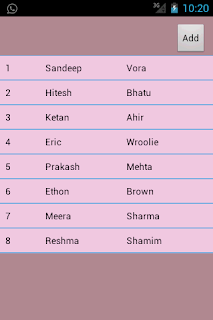
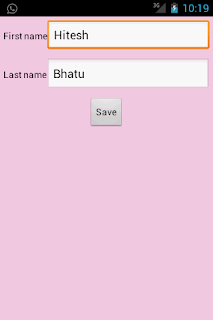
At the end of this tutorial we will get output as shown in following screenshots.
In this project we can add a person's first name and last name, edit it and delete it.
Special Thanks
Before moving towards coding I want to Thanks to Hiral Kanojiya. She wrote most of the code for this tutorial, I just guide her and then polished the code. Really without her help I could never get time to post this.
Thank You very much Hiral Kanojiya.
Screenshots

Special Thanks
Before moving towards coding I want to Thanks to Hiral Kanojiya. She wrote most of the code for this tutorial, I just guide her and then polished the code. Really without her help I could never get time to post this.
Thank You very much Hiral Kanojiya.
Screenshots


//Create table into SQLite Database
DbHelper.java
package com.hk.sqlitedemo;
import android.content.Context;
import android.database.sqlite.SQLiteDatabase;
import android.database.sqlite.SQLiteOpenHelper;
public class DbHelper extends SQLiteOpenHelper {
static String DATABASE_NAME="userdata";
public static final String TABLE_NAME="user";
public static final String KEY_FNAME="fname";
public static final String KEY_LNAME="lname";
public static final String KEY_ID="id";
public DbHelper(Context context) {
super(context, DATABASE_NAME, null, 1);
}
@Override
public void onCreate(SQLiteDatabase db) {
String CREATE_TABLE="CREATE TABLE "+TABLE_NAME+" ("+KEY_ID+" INTEGER PRIMARY KEY, "+KEY_FNAME+" TEXT, "+KEY_LNAME+" TEXT)";
db.execSQL(CREATE_TABLE);
}
@Override
public void onUpgrade(SQLiteDatabase db, int oldVersion, int newVersion) {
db.execSQL("DROP TABLE IF EXISTS "+TABLE_NAME);
onCreate(db);
}
}
//activity to add recored
AddActivity.java
package com.hk.sqlitedemo;
import android.app.Activity;
import android.app.AlertDialog;
import android.content.ContentValues;
import android.content.DialogInterface;
import android.database.sqlite.SQLiteDatabase;
import android.os.Bundle;
import android.view.View;
import android.view.View.OnClickListener;
import android.widget.Button;
import android.widget.EditText;
public class AddActivity extends Activity implements OnClickListener {
private Button btn_save;
private EditText edit_first,edit_last;
private DbHelper mHelper;
private SQLiteDatabase dataBase;
private String id,fname,lname;
private boolean isUpdate;
@Override
public void onCreate(Bundle savedInstanceState) {
super.onCreate(savedInstanceState);
setContentView(R.layout.add_activity);
btn_save=(Button)findViewById(R.id.save_btn);
edit_first=(EditText)findViewById(R.id.frst_editTxt);
edit_last=(EditText)findViewById(R.id.last_editTxt);
isUpdate=getIntent().getExtras().getBoolean("update");
if(isUpdate)
{
id=getIntent().getExtras().getString("ID");
fname=getIntent().getExtras().getString("Fname");
lname=getIntent().getExtras().getString("Lname");
edit_first.setText(fname);
edit_last.setText(lname);
}
btn_save.setOnClickListener(this);
mHelper=new DbHelper(this);
}
// saveButton click event
public void onClick(View v) {
fname=edit_first.getText().toString().trim();
lname=edit_last.getText().toString().trim();
if(fname.length()>0 && lname.length()>0)
{
saveData();
}
else
{
AlertDialog.Builder alertBuilder=new AlertDialog.Builder(AddActivity.this);
alertBuilder.setTitle("Invalid Data");
alertBuilder.setMessage("Please, Enter valid data");
alertBuilder.setPositiveButton("Ok", new DialogInterface.OnClickListener() {
public void onClick(DialogInterface dialog, int which) {
dialog.cancel();
}
});
alertBuilder.create().show();
}
}
/**
* save data into SQLite
*/
private void saveData(){
dataBase=mHelper.getWritableDatabase();
ContentValues values=new ContentValues();
values.put(DbHelper.KEY_FNAME,fname);
values.put(DbHelper.KEY_LNAME,lname );
System.out.println("");
if(isUpdate)
{
//update database with new data
dataBase.update(DbHelper.TABLE_NAME, values, DbHelper.KEY_ID+"="+id, null);
}
else
{
//insert data into database
dataBase.insert(DbHelper.TABLE_NAME, null, values);
}
//close database
dataBase.close();
finish();
}
}
//activity to display record in list
DisplayActivity.java
package com.hk.sqlitedemo;
import java.util.ArrayList;
import android.app.Activity;
import android.app.AlertDialog;
import android.content.DialogInterface;
import android.content.Intent;
import android.database.Cursor;
import android.database.sqlite.SQLiteDatabase;
import android.os.Bundle;
import android.view.View;
import android.view.View.OnClickListener;
import android.widget.AdapterView;
import android.widget.AdapterView.OnItemClickListener;
import android.widget.AdapterView.OnItemLongClickListener;
import android.widget.ListView;
import android.widget.Toast;
public class DisplayActivity extends Activity {
private DbHelper mHelper;
private SQLiteDatabase dataBase;
private ArrayList<String> userId = new ArrayList<String>();
private ArrayList<String> user_fName = new ArrayList<String>();
private ArrayList<String> user_lName = new ArrayList<String>();
private ListView userList;
private AlertDialog.Builder build;
@Override
public void onCreate(Bundle savedInstanceState) {
super.onCreate(savedInstanceState);
setContentView(R.layout.display_activity);
userList = (ListView) findViewById(R.id.List);
mHelper = new DbHelper(this);
//add new record
findViewById(R.id.btnAdd).setOnClickListener(new OnClickListener() {
public void onClick(View v) {
Intent i = new Intent(getApplicationContext(), AddActivity.class);
i.putExtra("update", false);
startActivity(i);
}
});
//click to update data
userList.setOnItemClickListener(new OnItemClickListener() {
public void onItemClick(AdapterView<?> arg0, View arg1, int arg2, long arg3) {
Intent i = new Intent(getApplicationContext(), AddActivity.class);
i.putExtra("Fname", user_fName.get(arg2));
i.putExtra("Lname", user_lName.get(arg2));
i.putExtra("ID", userId.get(arg2));
i.putExtra("update", true);
startActivity(i);
}
});
//long click to delete data
userList.setOnItemLongClickListener(new OnItemLongClickListener() {
public boolean onItemLongClick(AdapterView<?> arg0, View arg1, final int arg2, long arg3) {
build = new AlertDialog.Builder(DisplayActivity.this);
build.setTitle("Delete " + user_fName.get(arg2) + " " + user_lName.get(arg2));
build.setMessage("Do you want to delete ?");
build.setPositiveButton("Yes",new DialogInterface.OnClickListener() {
public void onClick(DialogInterface dialog, int which) {
Toast.makeText( getApplicationContext(),
user_fName.get(arg2) + " "
+ user_lName.get(arg2)
+ " is deleted.", 3000).show();
dataBase.delete(
DbHelper.TABLE_NAME,
DbHelper.KEY_ID + "="
+ userId.get(arg2), null);
displayData();
dialog.cancel();
}
});
build.setNegativeButton("No", new DialogInterface.OnClickListener() {
public void onClick(DialogInterface dialog, int which) {
dialog.cancel();
}
});
AlertDialog alert = build.create();
alert.show();
return true;
}
});
}
@Override
protected void onResume() {
displayData();
super.onResume();
}
/**
* displays data from SQLite
*/
private void displayData() {
dataBase = mHelper.getWritableDatabase();
Cursor mCursor = dataBase.rawQuery("SELECT * FROM " + DbHelper.TABLE_NAME, null);
userId.clear();
user_fName.clear();
user_lName.clear();
if (mCursor.moveToFirst()) {
do {
userId.add(mCursor.getString(mCursor.getColumnIndex(DbHelper.KEY_ID)));
user_fName.add(mCursor.getString(mCursor.getColumnIndex(DbHelper.KEY_FNAME)));
user_lName.add(mCursor.getString(mCursor.getColumnIndex(DbHelper.KEY_LNAME)));
} while (mCursor.moveToNext());
}
DisplayAdapter disadpt = new DisplayAdapter(DisplayActivity.this,userId, user_fName, user_lName);
userList.setAdapter(disadpt);
mCursor.close();
}
}
//adapter to load data into list
DisplayAdapter.java
package com.hk.sqlitedemo;
import java.util.ArrayList;
import android.content.Context;
import android.view.LayoutInflater;
import android.view.View;
import android.view.ViewGroup;
import android.widget.BaseAdapter;
import android.widget.TextView;
public class DisplayAdapter extends BaseAdapter {
private Context mContext;
private ArrayList<String> id;
private ArrayList<String> firstName;
private ArrayList<String> lastName;
public DisplayAdapter(Context c, ArrayList<String> id,ArrayList<String> fname, ArrayList<String> lname) {
this.mContext = c;
this.id = id;
this.firstName = fname;
this.lastName = lname;
}
public int getCount() {
// TODO Auto-generated method stub
return id.size();
}
public Object getItem(int position) {
// TODO Auto-generated method stub
return null;
}
public long getItemId(int position) {
// TODO Auto-generated method stub
return 0;
}
public View getView(int pos, View child, ViewGroup parent) {
Holder mHolder;
LayoutInflater layoutInflater;
if (child == null) {
layoutInflater = (LayoutInflater) mContext.getSystemService(Context.LAYOUT_INFLATER_SERVICE);
child = layoutInflater.inflate(R.layout.listcell, null);
mHolder = new Holder();
mHolder.txt_id = (TextView) child.findViewById(R.id.txt_id);
mHolder.txt_fName = (TextView) child.findViewById(R.id.txt_fName);
mHolder.txt_lName = (TextView) child.findViewById(R.id.txt_lName);
child.setTag(mHolder);
} else {
mHolder = (Holder) child.getTag();
}
mHolder.txt_id.setText(id.get(pos));
mHolder.txt_fName.setText(firstName.get(pos));
mHolder.txt_lName.setText(lastName.get(pos));
return child;
}
public class Holder {
TextView txt_id;
TextView txt_fName;
TextView txt_lName;
}
}
